Become a Kaya Chat Host or Agent
Kaya Chat is a live voice party app where you can join conversations, meet new people, host your own room, send virtual gifts, earn coins, and climb leaderboards. Host or help build a host team, start here and choose the path that fits your goals.

Get to know Kaya Chat before you start
Join the fun, host your own room, or build your team
Kaya Chat brings people together through live voice party rooms. You can drop into conversations, meet new friends, or send gifts. You can also host your own stream as a host. Kaya Chat also offers an agent path to earn with your team and referral activities.
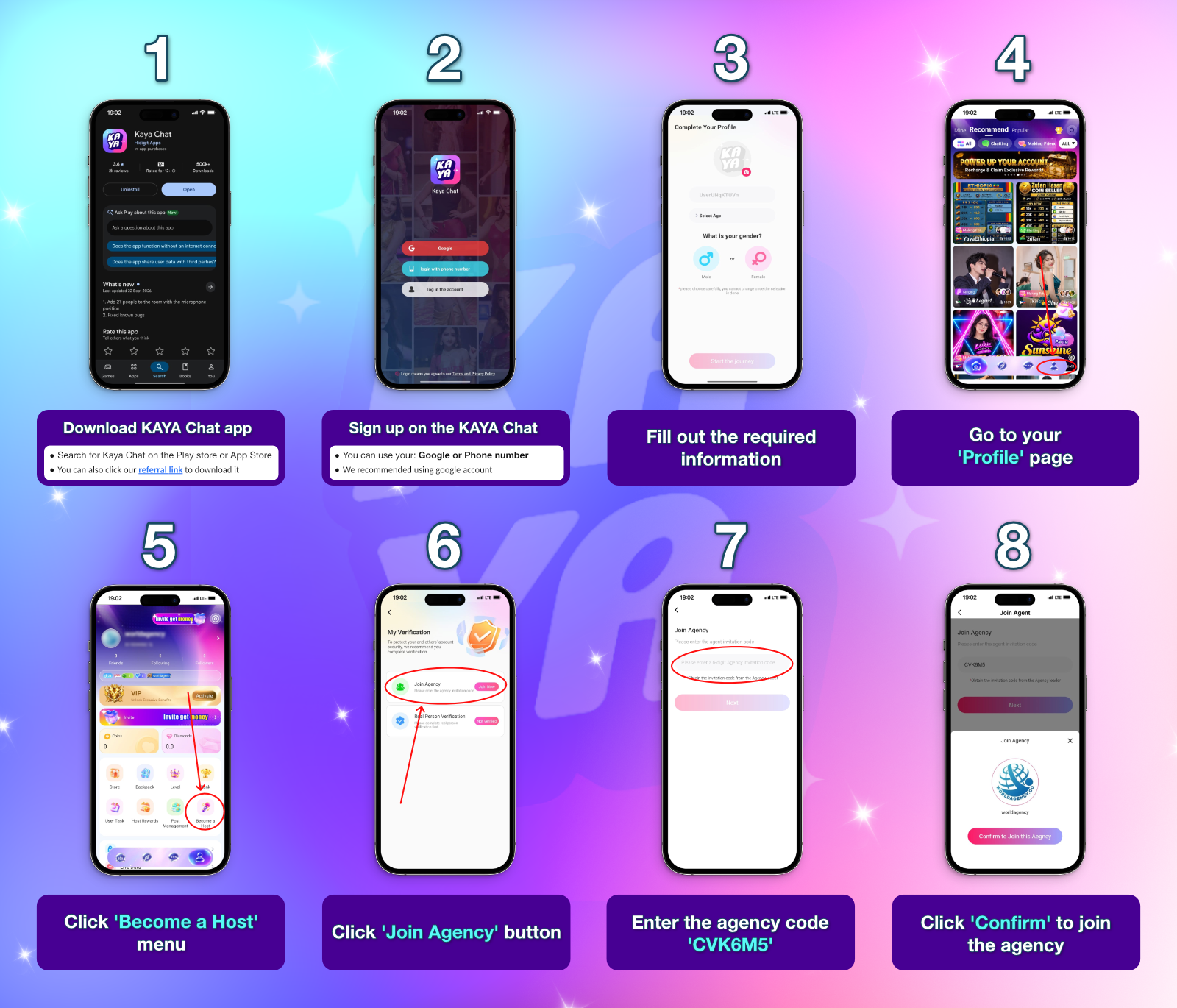
How to become a Kaya Chat host
Set up your account, verify your identity, and join an agency to get started as a host.
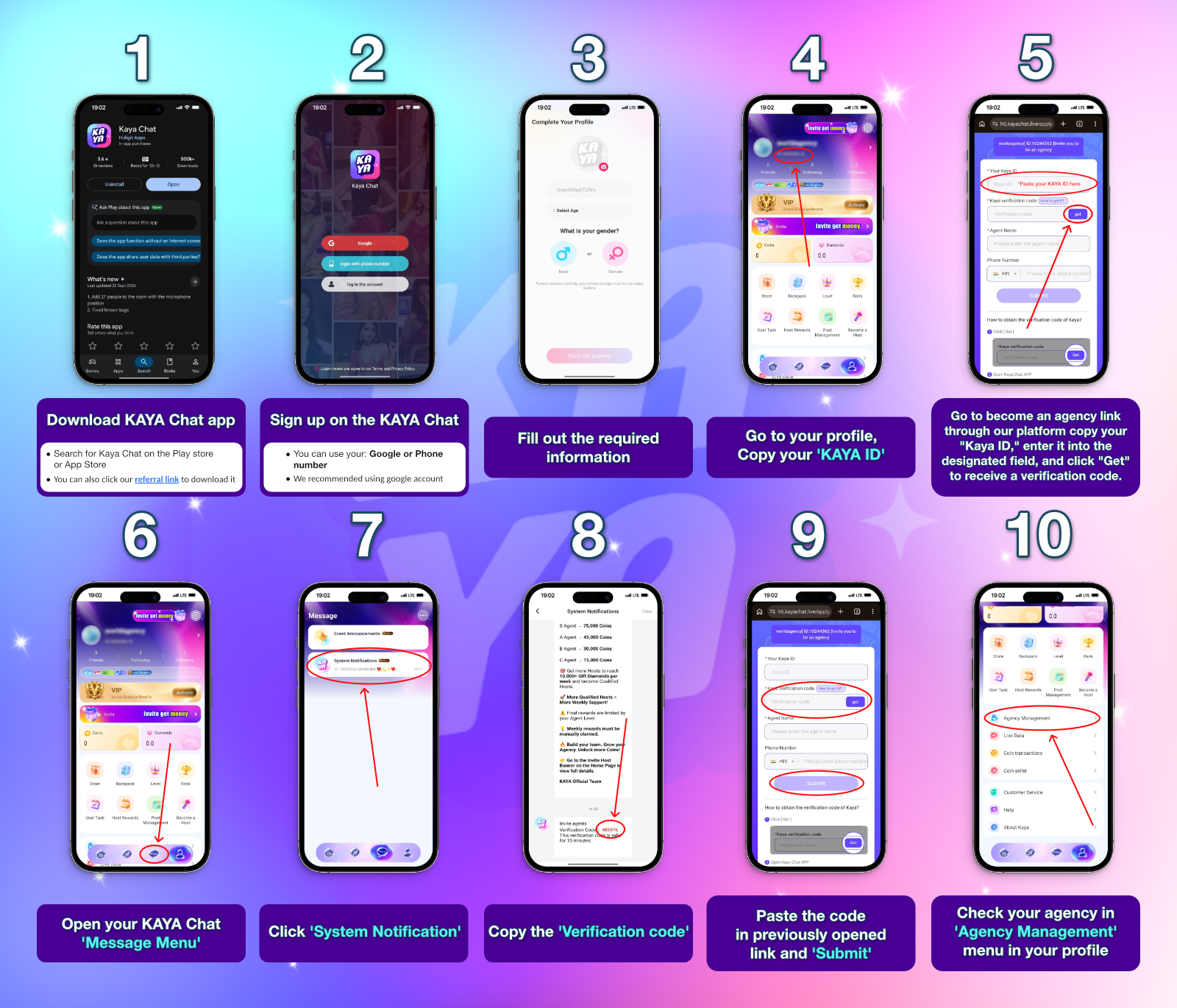
How to Become a Kaya Chat agent
Create your account, request a verification code, and submit your agent application.
Host or Agent: Which Role Suits You?
Hosts focus on voice-room activity and host rewards. Agents focus on building and supporting a host team, inviting hosts and sub-agents, and earning eligible commissions.
| Area | Host | Agent |
|---|---|---|
| Main role | Spend time on the mic, take part in host tasks, and welcome people into voice-room conversations. | Build and manage a host team, invite hosts and sub-agents, and support team activity. |
| Earning options | Mic-time rewards, the 7-Day Income Task, eligible gift sharing, invitation rewards, and ranking bonuses. | Agency and sub-agency commissions, game and host invitation rewards, and agency event bonuses. |
| Getting started | Create an account, complete real-person verification, and use "Join Agency" with an invitation code. | Create an account, copy your Kaya ID, complete the application verification steps, and check "Agency Management." |
| Ongoing responsibilities | Follow task requirements and app rules, and claim eligible rewards within the stated claim window. | Supervise hosts, guide them in creating quality content, and help the team follow app rules. |
| Can the roles overlap? | The main focus is hosting. | Agent accounts can also host |
Explore Earning Options & How to Withdraw
Hosts and agents have different ways to earn diamonds or coins. Your rewards depend on the activity you complete, the applicable targets, and the referral structure.
Sub-headline 1: Host Earnings
Table 1: Host Earning Sources
Table 2: 7-Day Income Task Levels
| Level | 7-day diamond income target | Valid mic hours per day | Hourly diamond reward |
|---|---|---|---|
| Top Tier (SS+, SS, S) | |||
| SS+ | For every increase of 10,000,000 | 2 | 250,000 + 30,000 |
| SS | 50,000,000 | 2 | 250,000 |
| S | 22,000,000 | 2 | 140,000 |
| Mid Tier (A, B, C, D) | |||
| A | 10,000,000 | 2 | 80,000 |
| B | 7,000,000 | 2 | 60,000 |
| C | 4,000,000 | 2 | 42,000 |
| D | 2,000,000 | 2 | 27,000 |
| Starter Tier (E to K) | |||
| E | 1,200,000 | 2 | 18,000 |
| F | 900,000 | 2 | 14,000 |
| G | 300,000 | 2 | 5,000 |
| H | 150,000 | 2 | 3,000 |
| I | 60,000 | 2 | 1,200 |
| J | 30,000 | 2 | 700 |
| K | 0 | 1 | 600 |
- Fifteen continuous minutes on the mic count as effective time.
- Task rewards must be claimed through the task system during the displayed claim window.
- Platform rewards do not count toward the diamond-income target.
Table 3: Host Invitation Reward Milestones
| Invited host's total income within 30 days | Reward at milestone | Total rewards |
|---|---|---|
| At least 100,000 coins | 10,000 diamonds | 10,000 diamonds |
| At least 200,000 coins | 10,000 diamonds | 20,000 diamonds |
| At least 500,000 coins | 30,000 diamonds | 50,000 diamonds |
| At least 1,000,000 coins | 30,000 diamonds | 80,000 diamonds |
- Invitees must register for the first time through your referral link or enter your ID in the invitation field.
- Each device can be counted only once.
- Rewards must be claimed when required by the task screen.
Sub-headline 2: Agent Earnings
Table 1: Agent Earning Sources
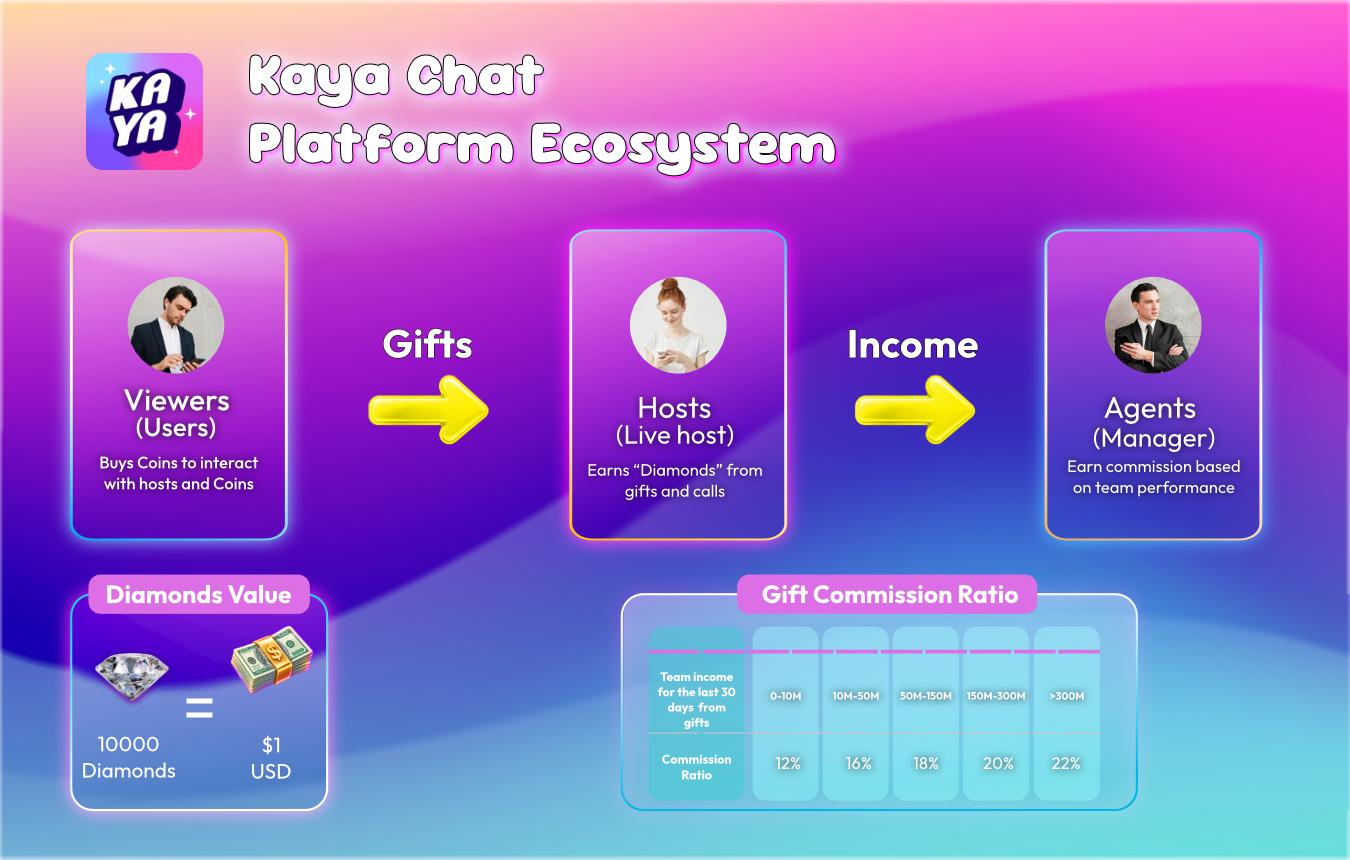
Table 2: Agency Commission Levels
| Level | Team gift income over the previous 30 days | Host income commission ratio |
|---|---|---|
| D | 0-10M | 12% |
| C | 10M-50M | 16% |
| B | 50M-150M | 18% |
| A | 150M-300M | 20% |
| S | More than 300M | 22% |
- Sub-agency rates also range from 12% to 22%.
- The income brackets used for sub-agency levels differ from the agency table, so check the applicable level shown for your account before calculating a commission.
Sub-headline 3: Withdraw Requirement
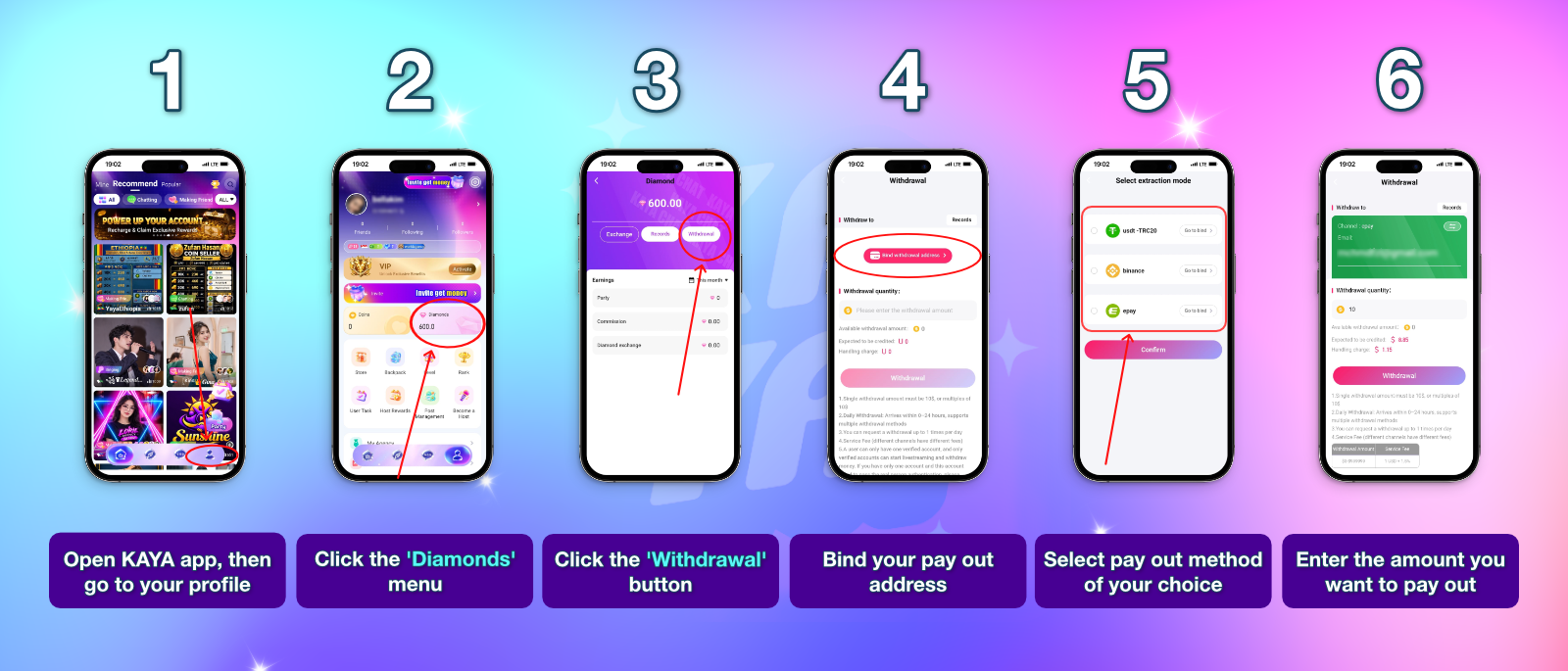
Sub-headline 4: Withdraw Tutorial
Frequently asked questions about Kaya Chat hosts and agents
Find quick answers about registration, earning options, team roles, and withdrawals.
Kaya Chat is a live voice party app where you can join voice rooms, meet people, host your own room, send virtual gifts, earn coins, and climb leaderboards.
Hosts focus on voice-room activity and host-related rewards. Agents build and support host teams, invite hosts and sub-agents, and can earn eligible commissions and referral rewards.
Download Kaya Chat, sign up, complete your profile, open Profile > "Become a Host," complete real-person verification, then tap "Join Agency" and enter the invitation code provided to you.
Create your Kaya Chat account, copy your Kaya ID, open the official agent application link, request a verification code, copy it from System Notification, submit it on the application page, and check "Agency Management" in your profile.
The registration flow includes real-person verification. Follow the on-screen instructions, use your own photo, keep your face clearly visible, and make sure it matches your registered identity information.
Host earning options include mic-time rewards, the 7-Day Income Task, eligible gift sharing, the Room Owner Bonus, game and host invitation rewards, and ranking events.
Agent earning options include agency commission, sub-agency commission, game invitation bonuses, host invitation rewards, and agency event bonuses.
The minimum withdrawal is $10, equivalent to 100,000 diamonds.
Ready to join Kaya Chat?
Join the conversation as a host or take the next step toward building a host team as an agent. Download Kaya Chat, set up your account right now.